
True Type Fonts
Last Updated: Jun 7th, 2025
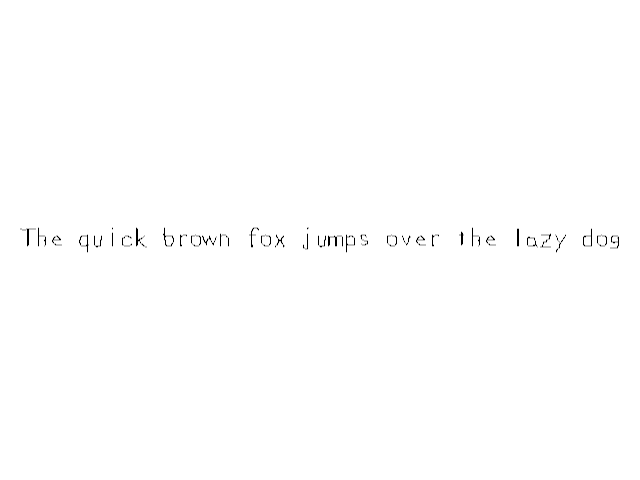
Here we're going to show text from TTF fonts using the SDL_ttf library./* Headers */ //Using SDL, SDL_image, SDL_ttf and STL string //Using SDL and STL string #include <SDL3/SDL.h> #include <SDL3/SDL_main.h> #include <SDL3_image/SDL_image.h> #include <SDL3_ttf/SDL_ttf.h> #include <string>
Make sure to have SDL_ttf installed and configured in your project and don't forget to include the SDL_ttf header.
/* Class Prototypes */
class LTexture
{
public:
    //Symbolic constant
    static constexpr float kOriginalSize = -1.f;

    //Initializes texture variables
    LTexture();

    //Cleans up texture variables
    ~LTexture();

    //Loads texture from disk
    bool loadFromFile( std::string path );

    #if defined(SDL_TTF_MAJOR_VERSION)
    //Creates texture from text
    bool loadFromRenderedText( std::string textureText, SDL_Color textColor );
    #endif

    //Cleans up texture
    void destroy();

    //Sets color modulation
    void setColor( Uint8 r, Uint8 g, Uint8 b);

    //Sets opacity
    void setAlpha( Uint8 alpha );

    //Sets blend mode
    void setBlending( SDL_BlendMode blendMode );

    //Draws texture
    void render( float x, float y, SDL_FRect* clip = nullptr, float width = kOriginalSize, float height = kOriginalSize, double degrees = 0.0, SDL_FPoint* center = nullptr, SDL_FlipMode flipMode = SDL_FLIP_NONE );

    //Gets texture attributes
    int getWidth();
    int getHeight();
    bool isLoaded();

private:
    //Contains texture data
    SDL_Texture* mTexture;

    //Texture dimensions
    int mWidth;
    int mHeight;
};
We're going to be adding the
If you're wondering what that
loadFromRenderedText which creates a texture from the string/color we provide it.If you're wondering what that
#if defined(SDL_TTF_MAJOR_VERSION) does, it checks if SDL_TTF_MAJOR_VERSION is defined which happens when we include SDL_ttf. This is a way to easily exclude the TTF rendering code from the LTexture because when we don't include
SDL_ttf.h, SDL_TTF_MAJOR_VERSION is not defined and it will omit the code sandwiched in the #if defined block. This is an example of a macro (using #include is also a macro) which is code that talks to the compiler.
/* Global Variables */
//The window we'll be rendering to
SDL_Window* gWindow{ nullptr };

//The renderer used to draw to the window
SDL_Renderer* gRenderer{ nullptr };

//Global font
TTF_Font* gFont{ nullptr };

//The texture we're going to render text to
LTexture gTextTexture;
We have a new data type for our TTF font file we're going to load: TTF_Font.
#if defined(SDL_TTF_MAJOR_VERSION)
bool LTexture::loadFromRenderedText( std::string textureText, SDL_Color textColor )
{
    //Clean up existing texture
    destroy();

    //Load text surface
    if( SDL_Surface* textSurface = TTF_RenderText_Blended( gFont, textureText.c_str(), 0, textColor ); textSurface == nullptr )
    {
        SDL_Log( "Unable to render text surface! SDL_ttf Error: %s\n", SDL_GetError() );
    }
    else
    {
        //Create texture from surface
        if( mTexture = SDL_CreateTextureFromSurface( gRenderer, textSurface ); mTexture == nullptr )
        {
            SDL_Log( "Unable to create texture from rendered text! SDL Error: %s\n", SDL_GetError() );
        }
        else
        {
            mWidth = textSurface->w;
            mHeight = textSurface->h;
        }

        //Free temp surface
        SDL_DestroySurface( textSurface );
    }

    //Return success if texture loaded
    return mTexture != nullptr;
}
#endif
Creating a texture from text works much like doing so from a file, but instead of calling
SDL_LoadBMP or IMG_Load to generate the surface, you can use TTF_RenderText_Blended. As you cansee, it otherwise works mostly the same as it does with loading from a file.TTF_RenderText_Blended is just one way to render a surface from text. There are other ways you can check out in the SDL_ttf documentation.
bool init()
{
    //Initialization flag
    bool success{ true };

    //Initialize SDL
    if( SDL_Init( SDL_INIT_VIDEO ) == false )
    {
        SDL_Log( "SDL could not initialize! SDL error: %s\n", SDL_GetError() );
        success = false;
    }
    else
    {
        //Create window with renderer
        if( SDL_CreateWindowAndRenderer( "SDL3 Tutorial: True Type Fonts", kScreenWidth, kScreenHeight, 0, &gWindow, &gRenderer ) == false )
        {
            SDL_Log( "Window could not be created! SDL error: %s\n", SDL_GetError() );
            success = false;
        }
        else
        {
            //Initialize font loading
            if( TTF_Init() == false )
            {
                SDL_Log( "SDL_ttf could not initialize! SDL_ttf error: %s\n", SDL_GetError() );
                success = false;
            }
        }
    }

    return success;
}
Much like how we have to initialize SDL with
SDL_Init, we need to initialize SDL_ttf with TTF_Init.
bool loadMedia()
{
    //File loading flag
    bool success{ true };

    //Load scene font
    std::string fontPath{ "08-true-type-fonts/lazy.ttf" };
    if( gFont = TTF_OpenFont( fontPath.c_str(), 28 ); gFont == nullptr )
    {
        SDL_Log( "Could not load %s! SDL_ttf Error: %s\n", fontPath.c_str(), SDL_GetError() );
        success = false;
    }
    else
    {
        //Load text
        SDL_Color textColor{ 0x00, 0x00, 0x00, 0xFF };
        if( gTextTexture.loadFromRenderedText( "The quick brown fox jumps over the lazy dog", textColor ) == false )
        {
            SDL_Log( "Could not load text texture %s! SDL_ttf Error: %s\n", fontPath.c_str(), SDL_GetError() );
            success = false;
        }
    }

    return success;
}
To open up a TTF font file we call TTF_OpenFont and pass in the path to the font and the size we want to render the font.
void close()
{
    //Clean up textures
    gTextTexture.destroy();

    //Free font
    TTF_CloseFont( gFont );
    gFont = nullptr;

    //Destroy window
    SDL_DestroyRenderer( gRenderer );
    gRenderer = nullptr;
    SDL_DestroyWindow( gWindow );
    gWindow = nullptr;

    //Quit SDL subsystems
    TTF_Quit();
    SDL_Quit();
}
When we're done with a font, we free it with TTF_CloseFont. When we want to close SDL_ttf, we call TTF_Quit.
                //Fill the background
                SDL_SetRenderDrawColor( gRenderer, 0xFF, 0xFF, 0xFF,  0xFF );
                SDL_RenderClear( gRenderer );

                //Render text
                gTextTexture.render( ( kScreenWidth - gTextTexture.getWidth() ) / 2.f, ( kScreenHeight - gTextTexture.getHeight() ) / 2.f );

                //Update screen
                SDL_RenderPresent( gRenderer );
Finally, here we render the text texture we loaded.
SDL_ttf has other method of rendering text which you can find in the SDL_ttf documentation. We'll be covering some of them in future tutorials, I just wanted to get started with this one because it's the easiest if you already know how to render SDL textures.
SDL_ttf has other method of rendering text which you can find in the SDL_ttf documentation. We'll be covering some of them in future tutorials, I just wanted to get started with this one because it's the easiest if you already know how to render SDL textures.